The amount of security services and products that are available are enough to confuse any business owner or executive as to what they need. The best practice is to first determine what you are looking to protect, and determine which are the employees who have access to the most critical and sensitive information your organization or business collects and stores. The cost of trying to deploy the same level of protection to all employees could be beyond the financial ability of your business to absorb. Approaching your security needs should be approached in layers, with the most layers deployed for your most vulnerable and vital operations.
Multi-Factor Authentication Best Practices
The warnings have been out there for a while now about why you should be using multi-factor authentication (MFA) for all accounts you and your employees utilize. This extends to any personal online accounts as well. We are told constantly that adding MFA will provide an additional layer of protection that will secure your accounts even if your passwords have been compromised. What we rarely hear is HOW you should implement MFA.
Recently, as reported by BleepingComputer, hackers were able to bypass the MFA security feature of one of the largest crypto exchanges called Coinbase. Hackers exploited a vulnerability in the company’s SMS (text-based) MFA setup. The attackers obtained the email addresses of Coinbase’s customers, along with passwords, and phone numbers. This allowed them to gain access to the SMS two-factor authentication token to gain access to a secured account. The result; 6,000 customers lost cryptocurrency from their accounts.
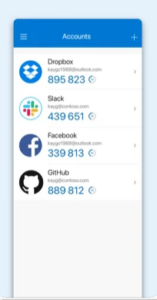
When setting up MFA on any of your accounts, we strongly recommend that you utilize a hardware security key solution or use an authenticator app. There are many third-party authenticator app solutions available, with some free options such as the Microsoft Authenticator or Google Authenticator apps. Many vendors that that sell an authenticator app also make some versions available for free as well. The bottom line is, yes, you should have MFA setup on ALL of your online accounts, and when hardware solutions are not available to you, use the app option instead.